Maker's Bench Organizers
Craft Project Agents

Craft Project Agents

Ready-to-run agents that build complete printable craft project organizers

Pages from Sewing Project Control Book, a complete 24-page planner made by one of the agents: the cover, the filled-in example and a register page

This collection is sold as 300 Agentic Prompts for Craft Project Organizers. Each one is an "agent": a written plan plus a small production program that builds one complete, undated 24-page craft project organizer as a print-ready PDF, with an editable HTML version you can type into.

Get all 300 agents · one-time payment

$27one-time · no subscription

Buy Now – $27

Instant digital download: one ZIP file (about 0 MB) on your download page right after payment. Works on Windows or Mac.

  • 24-page US Letter planner from every agent
  • PDF + editable HTML + JSON content
  • Complete Sewing Project Control Book example included

What is this, exactly?

It's a library of 300 agent folders. Each folder holds an instruction file (AGENT.md), an editable content plan (agent_spec.json) and a Python program (agent.py) that turns the plan into the finished files.

Every agent is written for one specific job, such as maker revision queue or personalization approval, in one situation and under one practical limit. Its seven modules have their own goals, fields, register columns and checkpoint questions.

The plain version: you choose an agent and run it, either with Python on your computer or by giving AGENT.md to an AI assistant that can create files. The agent brings the page plan, the wording and the layout. You bring your own entries and a look through every page before you print or sell.

The product says "Agentic Prompts" because each folder is a complete set of working orders, far more than a single prompt.

Why craft projects stall halfway

Nobody wrote the plan down. The pattern is in one place, the measurements are on a sticky note and the supplies list is in your head. Put the project down for two weeks and you can't remember where you were.

The templates are too generic. Most craft planners are pretty tracking sheets. They don't record the decisions that matter: which size you chose, what you changed and what to check before the next step.

Making a good printable is fiddly. Writing space that's actually big enough, margins that survive a home printer, a register you can reuse, a checkpoint that asks a useful question: each takes a few tries to get right.

None of these jobs is hard alone. Together they're why so many planner ideas stay ideas.

Introducing

300 Agentic Prompts for Craft Project Organizers

A Maker's Bench Organizers collection by Chauhan Pratik: three hundred agents for craft projects, each building its own 24-page planner on the same tested page system, so the planners feel like they belong to one series.

See a complete planner one agent made

Here's a finished result. Sewing Project Control Book is a complete example planner, and its full file set ships with your download.

Covers of the four example planners: Sewing Project Control Book, Woodcraft Project Record, Paper-Craft Collection Organizer and Knitting Project Companion

Sewing Project Control Book is for sewists organizing one owner-selected pattern project. Its seven modules are pattern and purpose brief, measurement confirmation, material and notion choices, cutting reference register, assembly progress notes, fitting and alteration decisions and finishing and future remake. Some of its 24 pages:

Eight pages from Sewing Project Control Book: the cover, the filled-in example, a module setup page, a 12-row register, a checkpoint and later module pages

Look at what's there. The filled-in example on page 3 imagines a fictional situation (a sewist records a chosen pattern before selecting materials) so you can see how the fields work before you start your own. Each module has three pages: a setup page, a 12-row working register and a checkpoint page. The pages are undated, the writing lines are spaced for handwriting, and the footer reminds you to print at actual size.

The other example planners

Sewing Project Control Book ships with the 300 collection. Three more core agents made complete planners on the same page system, so you can see how the set adapts. The Woodcraft Project Record example is shown for reference only; its files are not included in these collections (its agent is part of the 300 collection):

  • Woodcraft Project Record example page: A maker records a chosen freestanding display-box design
    Woodcraft Project Record is for makers documenting an existing owner-selected woodcraft design. Its modules run from design and intended-use record to project closeout dossier. The filled-in example imagines this: a maker records a chosen freestanding display-box design.
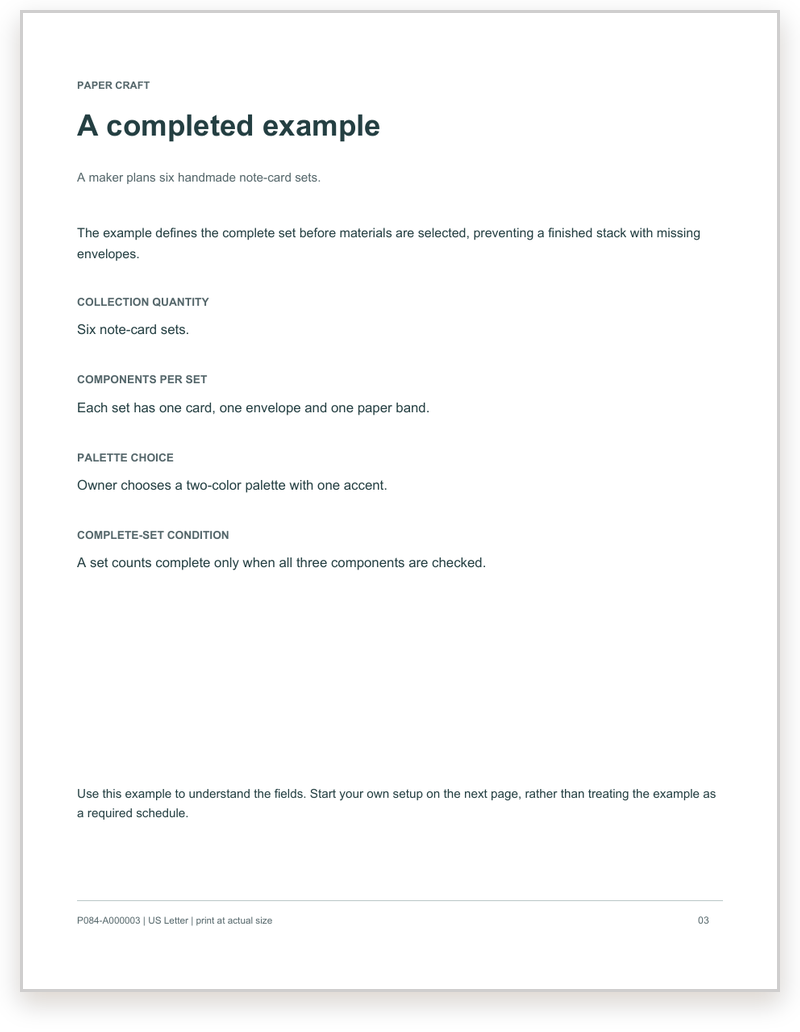
  • Paper-Craft Collection Organizer example page: A maker plans six handmade note-card sets
    Paper-Craft Collection Organizer is for paper crafters producing a coordinated handmade collection. Its modules run from collection and complete-set brief to packaging and collection notes. The filled-in example imagines this: a maker plans six handmade note-card sets.
  • Knitting Project Companion example page: A knitter records a chosen scarf pattern and its source
    Knitting Project Companion is for knitters recording an owner-selected pattern project. Its modules run from pattern and recipient brief to project archive and remake notes. The filled-in example imagines this: a knitter records a chosen scarf pattern and its source.

Four different jobs, one page system behind them.

What one agent does

When you run an agent, it works in this order:

Four steps: read the plan, build the planner, check the files, edit and reprint
  1. Read the plan. AGENT.md and agent_spec.json set out the title, the audience, the seven modules and the exact wording for every page. You can change the wording first if your situation is different.
  2. Build the planner. agent.py lays out the 24-page US Letter PDF and the editable HTML planner from that plan. The build itself is quick.
  3. Check the files. The program writes a page-content index and runs mechanical checks on page count, page size and text fitting inside its boxes.
  4. Edit and reprint. Type into the HTML planner in a browser, or edit the JSON plan and build again. Then look through every page yourself.

The files you end up with

Here's what the Sewing Project Control Book example contains, and what each agent is written to produce:

Deliverables: a 24-page PDF, an editable HTML planner, a JSON content plan and the check records
  • A 24-page printable PDF. US Letter: cover, quick-start and print guide, filled-in fictional example and seven modules.
  • An editable HTML planner. Type into it in a browser, then print or save it as a PDF. Entries stay only in the open tab until you do.
  • Editable JSON content. The full wording of every page, so you can change it and build again.
  • A page index and check records. What's on each page and the results of the mechanical checks.

What you need before you start

This is a library of agent folders, not a hosted app or a subscription.

  • Python 3 with the free ReportLab and pypdf packages, and an Arial or DejaVu Sans font pair on your computer. Or an AI assistant that can create and run files, given the agent's AGENT.md.
  • A computer for unpacking the download and opening the catalog spreadsheet.
  • A way to open .tar.xz archives. Free tools such as 7-Zip (Windows) or the built-in Archive Utility (Mac) do it.
  • Time to review. Building a planner is quick; reading all 24 pages and adjusting the wording to your needs takes longer.

No API key or paid image generator is needed. START_HERE.md walks you through the first run.

Delivery and file format

  • How it arrives: an instant digital download. Straight after payment, ClickBank takes you to your download page, where you download one ZIP file (about 0 MB) from pathwayscout.com. Your ClickBank receipt email links back to that page. Nothing is shipped.
  • What's in the ZIP: the agents packed in a .tar.xz archive, a .csv catalog, a START_HERE guide and licence, and one complete example as a folder of JSON data files, PDF files, HTML files and Python scripts.
  • Software you need: an unzip tool that opens .tar.xz (free 7-Zip on Windows, the built-in Archive Utility on Mac), a PDF reader, a spreadsheet app for the catalog, and the tools already listed above. Works on Windows or Mac; there's nothing from us to install.

Three hundred planners from a set of building blocks

The agents are built from 40 craft projects workflow tracks, 24 coordination contexts and 33 practical constraints. Each agent combines one of each, so its modules have their own goals, fields, actions and checkpoint questions. They are combinations of these building blocks, not hundreds of unrelated subjects.

A few of the agents you'll find in the catalog (workflow · context · constraint):

  • Tool owner handoff · sender and receiver · part not located
  • Custom request intake · one maker owner · source unavailable
  • Technique question inbox · new helper briefing · project cycle ending
  • Assembly dependency map · shared supply storage · first prototype only
  • Material remainder notes · separate material owners · work interrupted

AGENT_CATALOG.csv lists every agent with its workflow, context, constraint and folder name, so you can sort and choose.

Get all 300 agents for a one-time $27

What's inside: 300 agents, a 24-page printable planner per agent, PDF plus editable HTML and JSON, and the complete Sewing Project Control Book example
  • 300 agent folders, each with AGENT.md, agent_spec.json and agent.py
  • The complete Sewing Project Control Book example: 24-page PDF, editable HTML, JSON content and check records
  • AGENT_CATALOG.csv to sort and pick agents
  • START_HERE.md and a plain-English licence

Get all 300 agents · one-time payment

$27one-time · no subscription

Buy Now – $27

Instant digital download: one ZIP file (about 0 MB) on your download page right after payment. Works on Windows or Mac.

What you may and may not do

You may use and adapt the agents for your own projects and for client work, publish and sell the finished planners you make, and keep backup copies.

You may not resell, share or give away the agents, the catalog or the collection itself. No resale or private-label rights are included. Full wording is in the Terms of Service.

Who this is for

  • People who make and sell printable craft planners and want a written, repeatable way to build them.
  • Sewists, knitters, woodworkers and paper crafters who want undated project records.
  • Craft groups and teachers who prepare project worksheets.

It isn't for anyone looking for patterns, tool safety instructions or craft tutorials. The pages organize a project you have already chosen.

What happens after you click

  1. You'll go to the secure ClickBank checkout and pay once. ClickBank is the retailer and sends your receipt.
  2. You may see optional offers for other collections. Each one is your choice; you can skip them all.
  3. Right after payment you land on your download page, where you download your ZIP with your ClickBank receipt number. Your ClickBank receipt email links back to that page.
  4. Unzip, open START_HERE.md, and pick your first agent from the catalog.

Get all 300 agents · one-time payment

$27one-time · no subscription

Buy Now – $27

Instant digital download: one ZIP file (about 0 MB) on your download page right after payment. Works on Windows or Mac.

Frequently asked questions

Is this software or an app?

It's a library of agent folders. Each includes a small Python program that builds the planner on your own computer, plus the written plan it follows. There's no account, hosted app or subscription.

Can I use it without Python?

Yes, if you have an AI assistant that can create and run files: give it the agent's AGENT.md and agent_spec.json. A text-only chat can't produce the PDF.

Does it include patterns or tutorials?

No. The pages organize your own chosen pattern or design: materials, measurements, steps, changes and checks. They contain no patterns and no tool or safety instructions.

What size are the pages?

US Letter (8.5 × 11 inches), undated, made for printing at actual size. For A4 paper, print with "Fit" and check that the writing space is still comfortable.

Can I change the wording?

Yes. Edit agent_spec.json and build again, or type into the HTML planner and print or save it as a PDF.

How do I get the files?

Right after checkout, ClickBank takes you to your download page on pathwayscout.com, where you download your ZIP with your receipt number and checkout email. Your ClickBank receipt email links back to that page. Nothing is shipped.

Who do I contact with a question?

Email hello@pathwayscout.com with your ClickBank receipt number and I'll help.

Who's behind this?

I'm Chauhan Pratik. I put Maker's Bench Organizers together for planner makers and crafters who want project structure written down once. Questions are welcome at hello@pathwayscout.com.